Take Control with Notifications
Tired of too many notifications? We’ve got you covered.
We know SuperPath can get a little chatty so we just launched Notification Restrictions, giving you full control over which messages are sent to your team.
Now you can manage notifications across Email, Slack, and in-app messages, so only the right people hear from SuperPath at the right time.
💡 What’s New
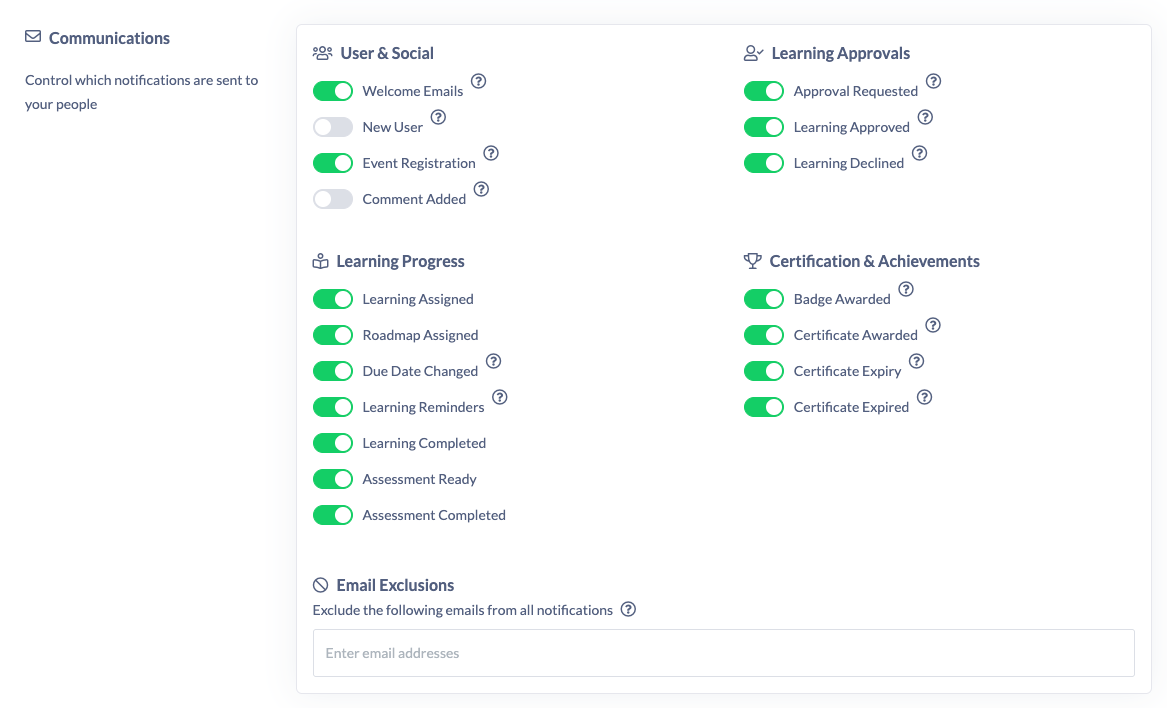
You’ll now find a new Communications area under Settings → Features.
Here, you can easily toggle on or off specific notifications, like when certificates expire, comments are added, or new users join.
Available notifications include:
• Certificate Expiry / Expired
• Certificate or Badge Awarded
• Welcome Emails & New User alerts
• Comments Added
• Event Registrations
• Learning Reminders (before and after due dates)
• Due Date Changes
• Learning Approvals (requested, approved, declined)
• Learning Assigned / Completed
• Assessments Ready / Completed
🔧 How It Works
You can control notifications at two levels:
1. Account Level: Manage which communications are sent across your organisation. This settings override any manual notifications (like assigning content)
2. User Level: Turn off notifications for specific users (perfect for busy admins or managers).
NOTE: If you try to disable an important notification (like approval requests), you’ll get a friendly warning before saving — helping you maintain completion rates and workflows.