Sync Form Completions Back to Your HR System
We’re excited to announce an upgrade to our HR integrations that gives you even more control and visibility over learning data in SuperPath.
You can now sync form completions directly back to your HR system, ensuring surveys, forms and quizzes are recorded against the employee’s learning record, automatically and accurately.
This update is available for our HRIS integrations where syncing back to the learning record is enabled
✨ What’s new?
Previously, SuperPath could sync pathway completions and individual course or assignment completions back to your HR system, but forms were excluded.
With this release, you can now:
- Sync individual form completions back to the employee’s HR record
- Choose whether a pathway completion or individual step completion is sent to your HR system
- Record multiple learning activities from a single pathway as separate learning records in your HR platform
This gives HR teams far greater flexibility when tracking compliance, onboarding, feedback and assessments.
🧠 Why this matters
Forms are often used for:
• Compliance declarations
• Policy acknowledgements
• Onboarding surveys
• Knowledge checks and quizzes
By syncing form completions back to your HR system, you can:
• Maintain a single source of truth for employee learning records
• Reduce manual admin and data reconciliation
• Confidently demonstrate compliance and completion
• Keep HR and learning data perfectly in sync
🖥️ How it works (at a glance)
Assignments
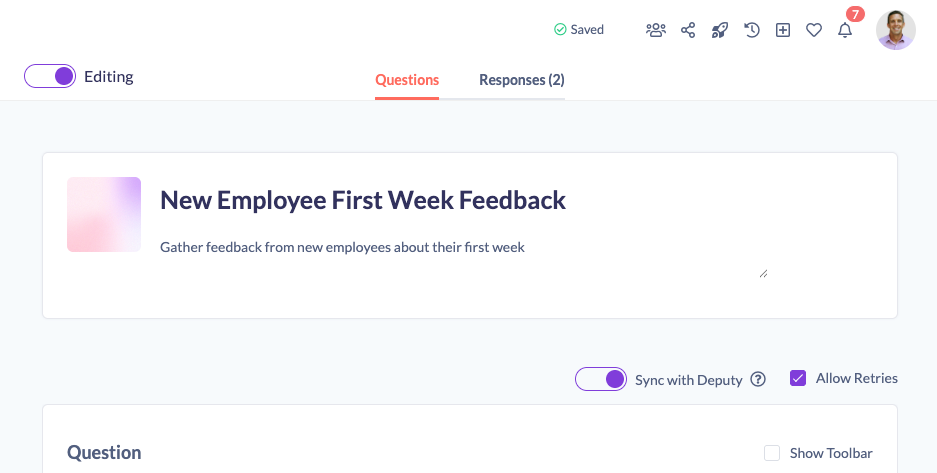
- Enable HRIS sync on a form in the editor
- Assign the form to a user
- The user completes the form
- Completion data is automatically sent back to the HR system
Pathways
- Add the form as a step in a pathway
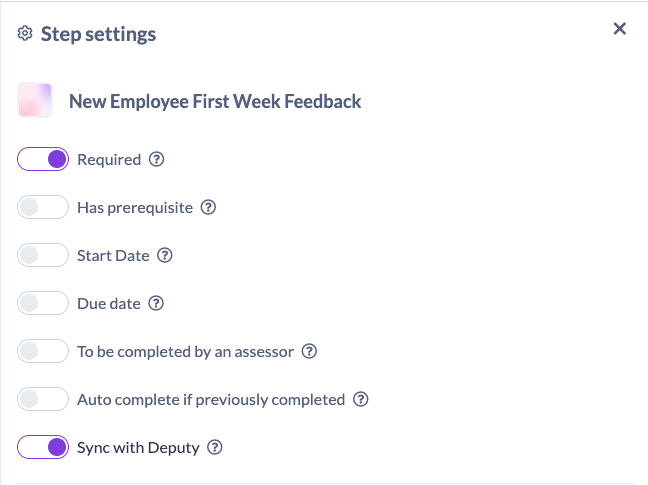
- Open the step settings for the form and turn on Sync With HRIS
- [Optional] - Turn off the Pathway Sync With HRIS
- Assign Pathway
⸻