Send Custom Notifications from Quick View Reports
Nudge the right learners, right when it matters
You can already see exactly who's tracking and who's fallen behind in your quick view reports. The missing piece was being able to do something about it on the spot. Until now, if you wanted to chase a few learners with your own message, you were stuck waiting on the standard due-date reminders or building a full workflow. Not any more.
You can now send a custom notification to your learners directly from any quick view report, in your own words, in just a couple of clicks.
Message learners straight from the report
Open any quick view report (the little report icon you'll spot throughout SuperPath), find the learners you want to reach, and send them a notification then and there. No workflow to set up, no waiting on the system. If you can see them in the report, you can message them.
A common one: filter to everyone who hasn't started a pathway yet, then send a friendly prompt to get them moving.
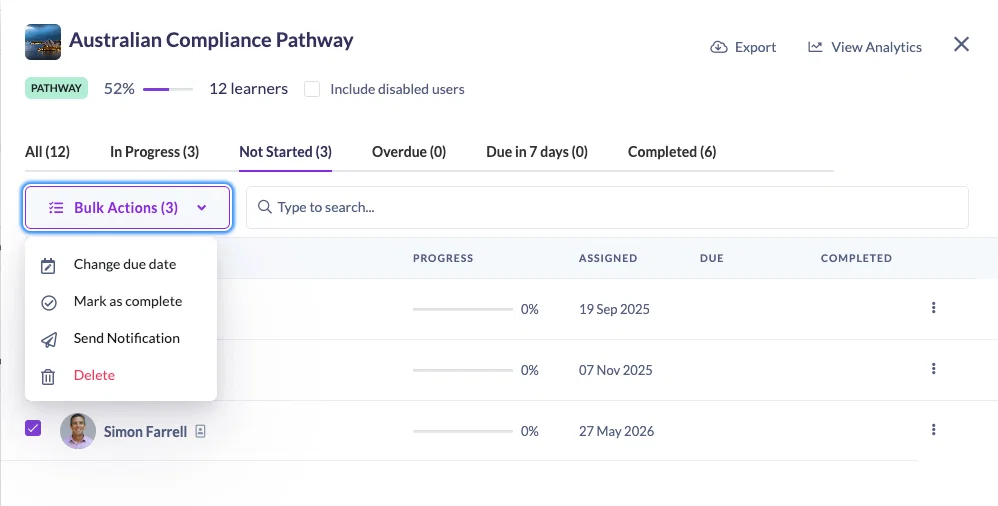
One learner or the whole group
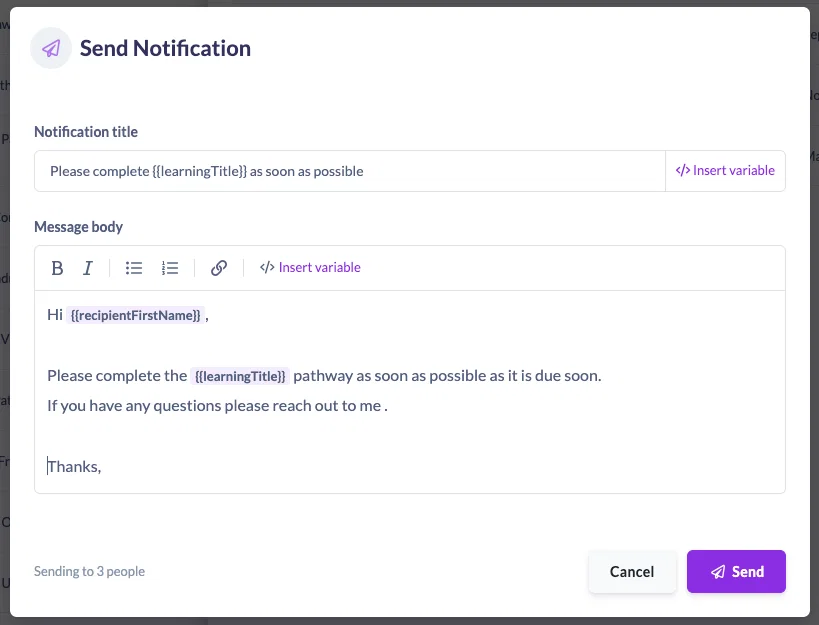
Send to a single person, or select multiple learners and message them all at once. SuperPath confirms exactly how many people the notification is going to before it sends, so there are no surprises.
Make every message feel personal
Drop in variables so each notification reads like it was written for the person opening it. Insert the recipient's name and the learning title, and SuperPath fills in the rest automatically.
For example: "Hi [Recipient name], please complete [Learning title] by the due date."
Where it fits in your day
Think of this as the quick, in-the-moment companion to workflow notifications. Set up a Workflow when you want a message to fire automatically every time something happens. Reach for quick view reports when you want to send something right now to the specific learners in front of you, whether they're yet to start, partway through, or anywhere in between.
Next time you're checking on progress, give it a go. Open a quick view report, pick your learners, and send. 🙌