Quick View Bulk Actions
Managing learners just got faster.
We’ve released Quick View Bulk Actions, a small but mighty enhancement that makes everyday admin tasks quicker, easier, and far less click-heavy. It’s another step towards our goal of being the world’s easiest LMS to administer.
What’s new?
Anywhere you see a list of learners using the quick view (on content, pathways, events and forms), you can now take action on multiple users at once. Instead of updating learners one by one, you can now select several (or all) and apply changes in a single step.
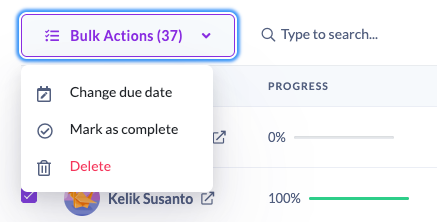
From the Quick View panel, you can now:
- Change due dates in bulk: Perfect for when timelines shift or assignments need extending across a group.
- Mark multiple learners as complete: Ideal if learners have completed training offline, left the business, or no longer need to finish the course.
- Delete assignments in bulk: Quickly clean up incorrect or outdated assignments without repetitive admin work.
Why this matters
We know LMS admins juggle a lot. This update means:
• ⏱️ Less time on repetitive tasks
• 🎯 Fewer clicks to get work done
• 🧠 Cleaner, more accurate learner data
• 😌 A smoother day-to-day admin experience
It’s a simple change that makes a big difference!