Quick View Analytics
We’re excited to introduce Quick View Analytics, a small but mighty feature that helps you instantly visualise the status and completion of your learning content.
Whether you’re managing a pathway, form, event or piece of content, you can now see how learners are progressing at a glance, no spreadsheets or manual counting required!
From any pathway, event, forms or content item, simply click View Learners, then select View Analytics.
You’ll see a visual summary of learner engagement, including:
• Completion over time: quickly understand how participation trends are tracking.
• Status distribution: view the proportion of learners who have not started, in progress or completed.
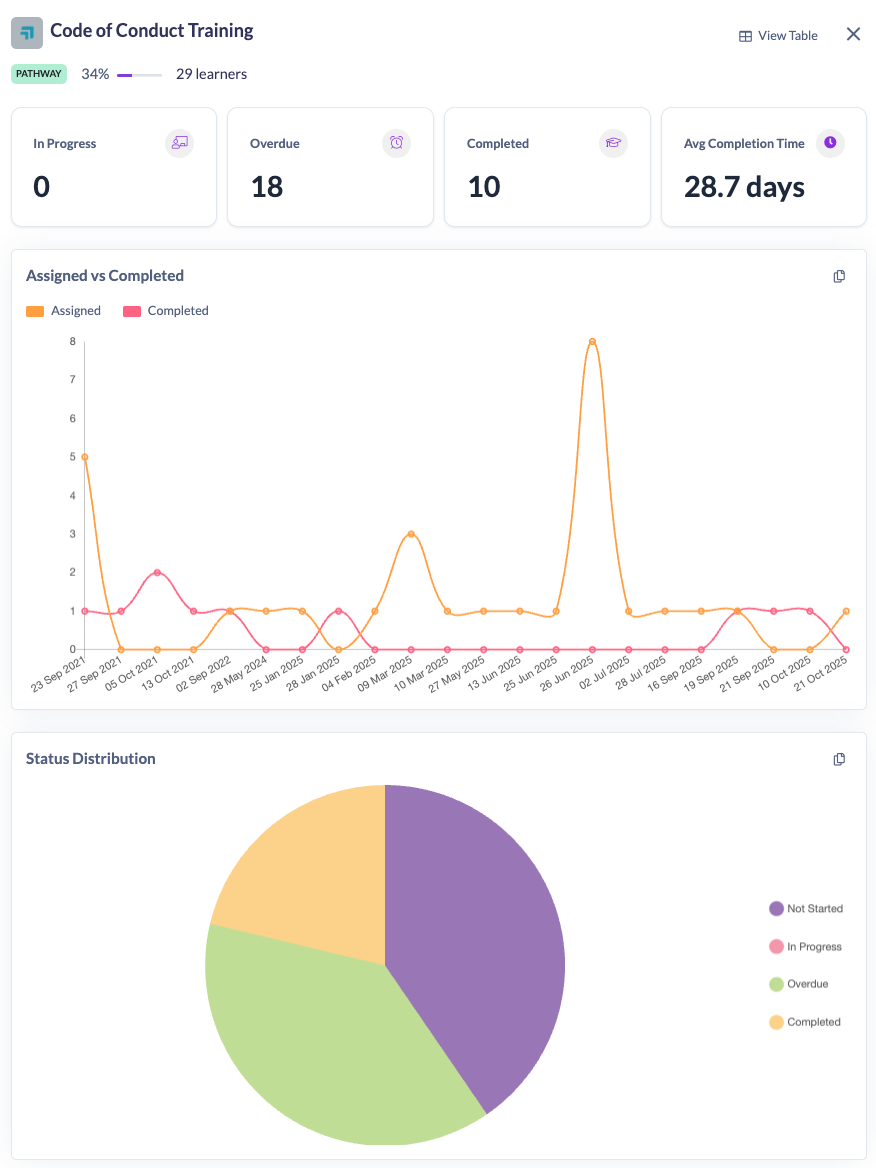
📋 Share insights in seconds
Need to report your training progress to your team or manager?
Use the Copy button to instantly grab a snapshot of your analytics, then paste it straight into a presentation, document, or report.
💡 Why it matters
Quick View Analytics makes it easier to:
• Spot trends in learner engagement and completion.
• Save time preparing reports and updates.
• Communicate progress visually with your team or stakeholders.
A small addition, but a big win for keeping learning initiatives on track and transparent.