Dynamic Teams
Better reporting and smarter content assignment - introducing Dynamic Teams
Until now, keeping your teams up to date in SuperPath meant manual effort. If you wanted to assign a compliance course to everyone in Customer Service who'd already completed a specific pathway, you had to track that down yourself, build the list, and maintain it over time.
Dynamic Teams changes that.
What's New
You can now create teams that automatically include the right people, based on criteria you define. As your learners progress, your Dynamic Teams update in real time, so you're always working with accurate, current groups.
No more manual list management. No more cross-referencing completion data.
How it works
When creating a team in SuperPath, admins and managers can now choose to make it a Dynamic Team. From there, you define one or more criteria and anyone who meets all of them is automatically included.
You can build Dynamic Teams based on any combination of:
- Team membership — include people who are already part of a specific team
- Pathway completion — include people who've completed a specific pathway
- Learning content completion — include people who've completed a specific piece of content
- Content assignment — include people who've been assigned specific content
- Event completion — include people who've completed a specific event
- Form completion — include people who've completed a specific form
- Knowledge article completion — include people who've completed a knowledge article within a pathway
- User fields — include people who match specific profile attributes
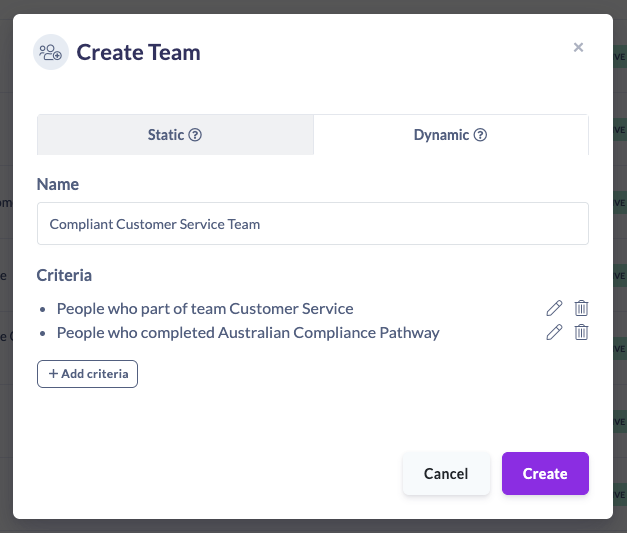
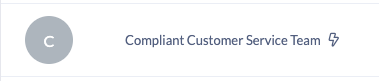
All criteria work as AND logic — a learner must meet every condition to be included in the team.Dynamic Teams are identified by a lightning bolt icon ⚡ so you can easily tell them apart from static teams at a glance.
Where you can use Dynamic Teams
Once created, Dynamic Teams work exactly like static teams for:
- Content assignment — assign pathways, courses, events, and more to a Dynamic Team, and the right people get it automatically
- Reporting — filter your reports by a Dynamic Team to see completion data, progress, and engagement for exactly the group you care about
Note: Dynamic Teams are not yet supported in Workflows. This is on our roadmap.
A practical example
Say you manage compliance training across your organisation. You need to make sure everyone in your Customer Service team who's already completed the Australian Compliance Pathway also gets assigned your new Code of Conduct course.
With Dynamic Teams, you'd:
- Create a Dynamic Team called Compliant Customer Service Team
- Add two criteria: Part of the Customer Service team + Completed the Australian Compliance Pathway
- Assign the Code of Conduct course to that Dynamic Team
SuperPath does the restand as more people in Customer Service complete the pathway, they're automatically added to the team and picked up for future assignments.
Getting started
Head to Teams in your SuperPath admin panel and select Add Dynamic Team to get started. If you have questions, our Help Centre article walks through the full setup step by step.