Custom Notifications
Send the right message, to the right people, at exactly the right moment
SuperPath already sends plenty of helpful messages out of the box, things like welcome emails, assignment alerts and reminders. But sometimes you need to say something specific. A warmer welcome to a new starter, a heads-up to a manager when someone joins their team or a congratulations when a learner finishes a roadmap.
Custom Notifications let you build exactly those messages and send them automatically, all through Workflows.
Turn any workflow event into a tailored message
We've added a new Send Notification action to Workflows. Pick a trigger, decide who hears about it, and write the message yourself. SuperPath handles the rest, automatically, every time that event happens.
A few examples of what you can set up:
- When a person joins, welcome them by name and point them to the library.
- When someone joins a specific team, send them a tailored welcome, or let their manager know they've arrived.
- When a learner completes a roadmap or learning pathway, send a congratulations and nudge them towards their next step.
Choose exactly who gets the message
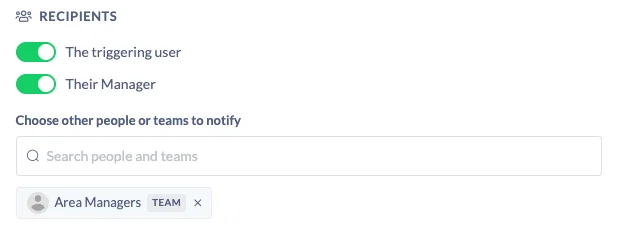
Every notification can go to the people who actually need it. You're not limited to the person who triggered the workflow.
You can send to the triggering user (the person who joined or completed something), their manager, specific individuals, or entire teams. So when a new starter joins, you could welcome them, notify their manager, and let your HR team know, all from the one workflow.
Make it personal with variables
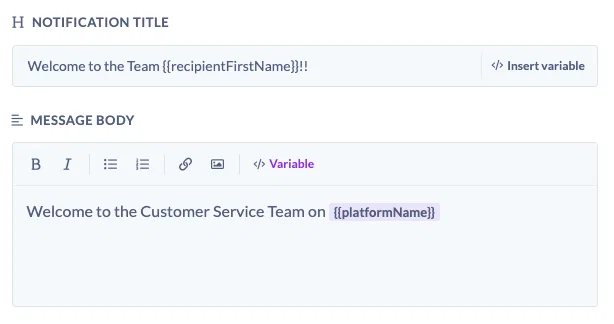
Notifications pull in live details so every message feels written for the person reading it. Drop in variables like the recipient's name, the triggering person, the platform name, or the relevant learning or roadmap, and SuperPath fills them in automatically.
A simple example: "Welcome [Recipient name] to [Platform name]." When a learner finishes a roadmap, you could reference it directly, for example "Congratulations on completing [Triggering entity]."
Make it look like you
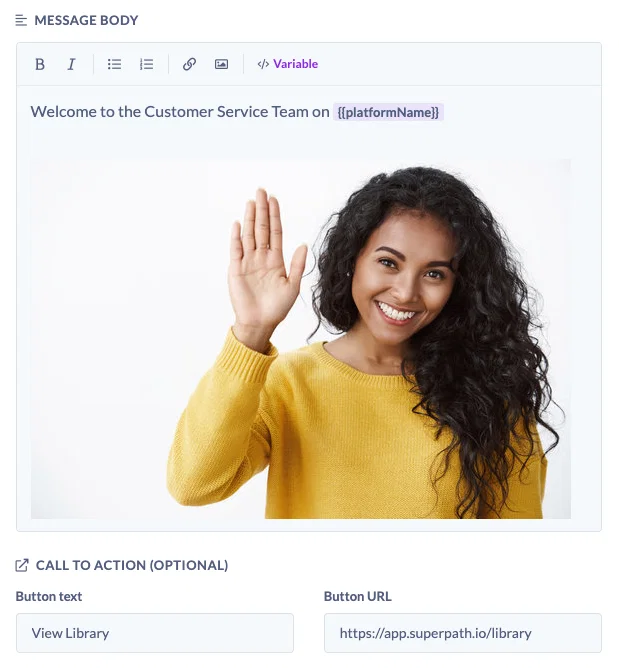
Notifications aren't just plain text. You can add images, links and buttons so the message reflects your brand and gives people somewhere to go. A clear button like "View the library" turns a notification into a next step, not just an announcement.
Test before you send
Not sure it's quite right? Hit Send a test to me and the notification lands in your own inbox so you can check the wording, variables and styling before it goes live.
Custom Notifications give you a powerful, granular way to communicate at the exact moments that matter, in your own words and your own style. Head to Settings, then Workflows, and give it a go.