Custom Certifications
Personalised certificates, automatically generated for every learner
Until now, certificates in SuperPath were either:
• Manually uploaded to a learner’s profile, or
• Automatically awarded when a learner completed a pathway, course, or event
While this worked well, certificates were generic — meaning you couldn’t personalise them with the learner’s name.
✨ What’s new?
You can now create custom certificates that automatically include:
• The learner’s name
• The completion date
• Your own branded certificate design
Once set up, certificates are generated automatically when learning is completed — no manual work required.
🎯 Why this matters
• More professional – Learners receive a personalised certificate they’re proud to share
• Fully automated – No more manual uploads or post-completion admin
• Flexible – Works across pathways, courses, SCORM content, events, and AI learning
• Consistent branding – Upload your own certificate design and apply it at scale
🛠 How it works (high level)
1. Upload your certificate design (PDF)
2. Enable name and date generation
3. Customise font size, colour, and layout
4. Assign the certificate to a pathway, course, or event
5. Learners complete the learning → certificate is automatically awarded 🎉
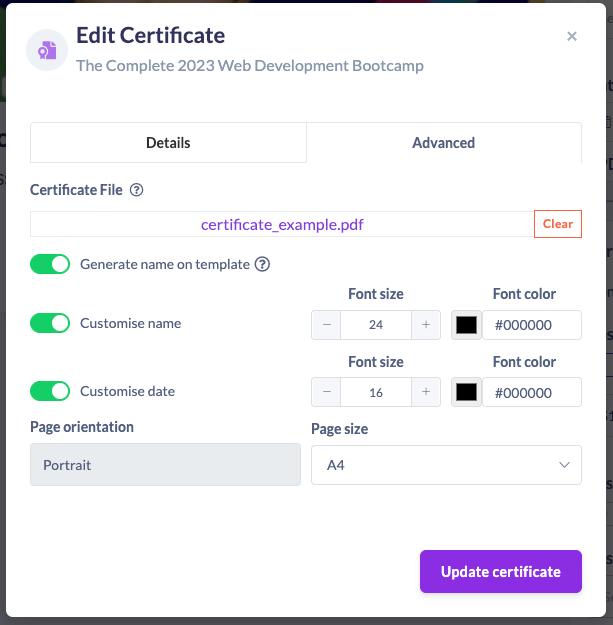
If you have a specific placement requirement (for example, the learner’s name not centred), our team can help configure this for you behind the scenes.
This upgrade makes certifications in SuperPath more meaningful, more polished, and completely hands-off.