Certificate Expiry Notifications
Never miss a certificate expiry again
Certificates are only as valuable as the people keeping track of them. Now, when a certificate is due to expire, you can make sure the right people, not just the learner get the heads-up.
What's new
We've extended certificate notifications to include additional recipients. Admins can now choose who gets notified when a certificate is approaching expiry — so compliance risks don't slip through the cracks just because someone wasn't watching their inbox.
This builds on the same notification framework we introduced for assignment completions — just applied to certificate expiry.
How it works
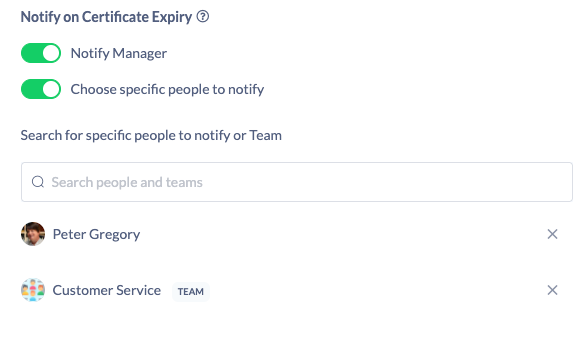
Head to Settings → Features → Certificates, open any certificate, and scroll to the bottom. You'll find a new section where you can choose who to notify when that certificate is due to expire.
You can notify:
- The learner's manager — automatically, without needing to name anyone specifically
- Individual users — add specific people from your organisation
- Teams — the recommended approach (more on this below)
Notifications are sent at 30, 60 and 90 days before expiry, giving recipients enough runway to take action.
The smarter way: use a team
We strongly recommend adding a team rather than individual users as your notification recipients. When you add a team, like your compliance team you can add and remove members over time without touching the certificate settings. The right people are always in the loop, even as your organisation changes.
Head into your certificate settings and give it a go. 🙌