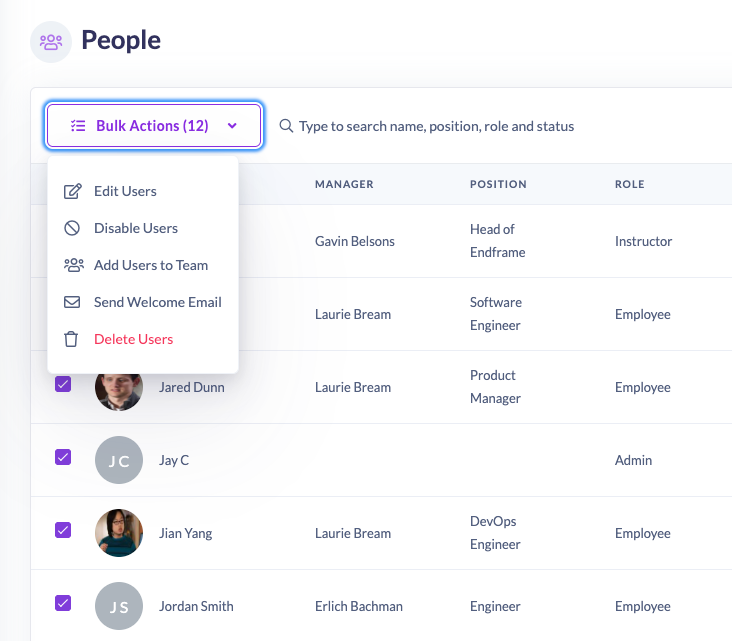
Bulk Edit Users — Simplify User Management in Seconds
Managing users just got a whole lot easier.
We’re excited to announce the launch of Bulk Edit Users, a powerful new feature that allows admins to quickly make changes to multiple users at once, saving time and effort while keeping your user data organised.
Whether you’re updating roles, cleaning up inactive users, or adding new team members, Bulk Edit makes it simple.
✨ What’s new
With Bulk Edit Users, you can now select multiple users across your user list (even across multiple pages) and perform any of the following actions:
• 📝 Edit user details — Update user information such as position, role, country, time zone, and login type.
• 👥 Add to a team — Instantly add selected users to a specific team.
• 🚫 Disable users — Temporarily remove access for users who no longer need it.
• 🗑️ Delete users — Remove users you no longer need in your system.
• 📧 Send Welcome email — Quickly send onboarding emails to multiple users at once.
These actions come with built-in confirmations, ensuring you always have full control and visibility before changes go live.
💡 Why it matters
Admins told us they wanted a faster, more flexible way to manage users — especially when onboarding, offboarding, or making team-wide updates.
Bulk Edit Users helps you:
• Save hours of manual edits
• Keep your data clean and consistent
• Improve onboarding workflows
• Streamline team management
🚀 How it works
1. Go to Users in your People List
2. Tick the checkbox next to the users you want to edit (your selection stays across pages!).
3. Open the Bulk Actions dropdown and choose your desired action.
4. Review the confirmation and apply the change.