Acknowledgements are now built into the learning itself
You can now require a learner to acknowledge a statement before a learning counts as complete, right on the learning itself.
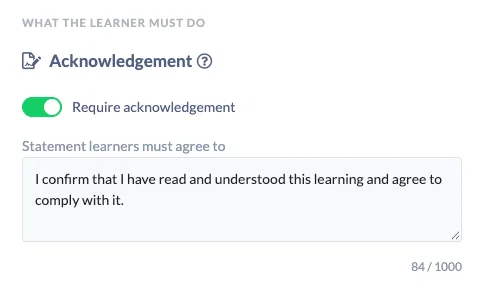
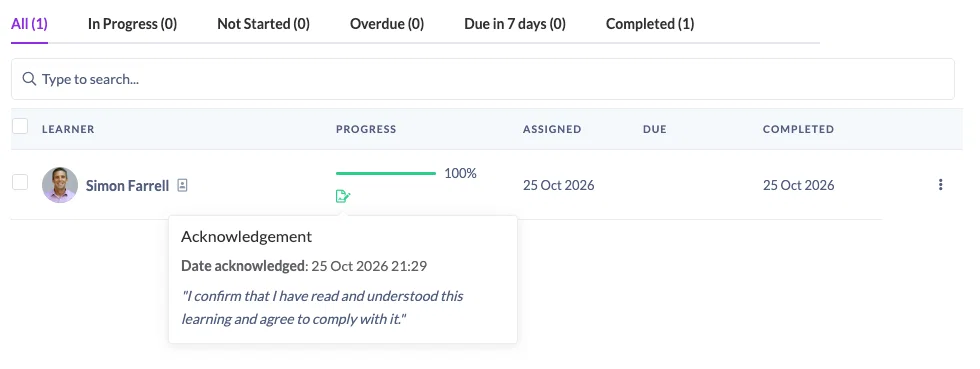
Turn on Require acknowledgement, write the statement your learners must agree to, and SuperPath does the rest. The learner reads, watches or completes the content, ticks the statement, and their record shows the date they acknowledged and the exact wording they agreed to.
The problem we've solved
Until now, a policy acknowledgement in SuperPath meant building it yourself. You created a Pathway, added the policy as one step, then built a Form with a single "I agree" checkbox and added that as the next step.
It worked, but it was a lot of setup for something so common. The record of who agreed lived on the Form, not on the policy they had read, so reporting on it meant digging through form results. And because it needed a Pathway, you couldn't put an acknowledgement on a single assigned document, video or course at all.
Now the acknowledgement belongs to the learning itself. One switch, one statement, and the record sits exactly where you'd expect to find it.
How it works
You'll find the new Acknowledgement setting everywhere you set up learning:
- When you assign content or an Event, under Advanced, for assigning now or scheduling for later.
- On Pathway steps, in the step settings, for content, Knowledge, text and Event steps.
- In Workflows that assign content or an Event, and in schedules, so every assignment they create carries it.
The statement starts with a sensible default you can edit each time, for example "I confirm that I have read and understood the Code of Conduct and agree to comply with it."
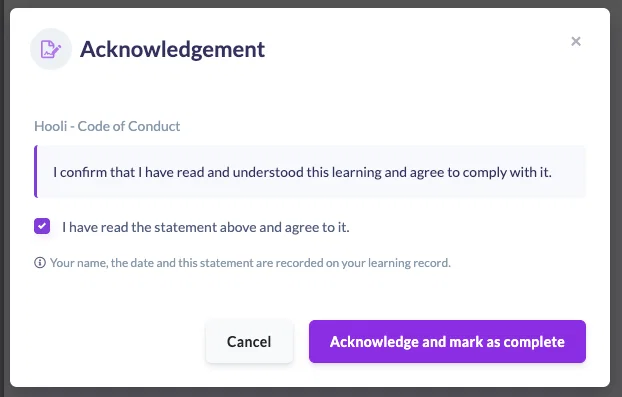
Your learners see an Acknowledgement required chip on the learning and an Acknowledge button where Mark as complete used to be. One click opens the statement, they tick to agree, and it's done. For a video or a SCORM or Mindsmith course, the button unlocks once they've finished it, and for an Event once it has started, so learners complete the content before they agree to it. Documents, links and Knowledge articles can be acknowledged straight away. It all works the same way on a phone.
It works with everything you already use
Acknowledgement slots straight into the workflows you rely on today:
- With approval switched on, acknowledging submits the learning for review, and the approver sees the acknowledgement alongside everything else.
- With evidence required, the learner acknowledges first, then submits their evidence as usual.
- If an approver declines and the learner resubmits, they aren't asked to acknowledge again.
- Workflows and recurring schedules carry the acknowledgement onto every assignment they make, which makes annual policy refreshers easy to automate.
In your reports, an acknowledgement icon shows who has acknowledged and who hasn't, and CSV exports include Acknowledgement Required and Date Acknowledged columns.
Worth knowing
- Only the learner can acknowledge. If an admin marks a learning complete on their behalf, it completes without an acknowledgement and reports show it as not acknowledged.
- Changing the statement later never removes an acknowledgement already given. The learner's record keeps the exact wording they agreed to.
- Acknowledgement isn't available on Forms, Goals, Roadmaps or a Pathway as a whole. Inside a Pathway, set it on the step.
- Your existing Pathway and Form acknowledgements keep working exactly as before.
Full details are in How to Require an Acknowledgement on a Learning and How to Acknowledge a Learning, and our updated guide to running policy and compliance acknowledgements.